Billing: pay, change or cancel Team
How a director pays for the Team plan, changes the card, cancels, asks for a refund, and what happens when a payment fails.
On this page
This article shows a director how to pay for the Team plan, change or cancel it, and what happens when a payment fails.
Before you start
- Only a director can upgrade, manage billing or cancel. Managers and area leads can see the plan but not change it.
- Billing is on the web, in Settings > Plan. The Android app shows no prices and can't take payment.
- Payments go through Stripe. ClearAudit never sees your card number.
- For what each plan includes and the price in your currency, see Plans and pricing.
Upgrade to Team
- On the web, open Settings > Plan.
- Choose Monthly or Yearly and check the currency.
- Click Upgrade to Team. Stripe's payment form opens inside ClearAudit, on the Upgrade to Team page. Use Back to leave without paying.
- Enter your card, or another payment method Stripe offers in your country, and the billing details Stripe asks for.
- Click Subscribe. You come back to Settings > Plan, which says "You're on Team" within a few seconds.
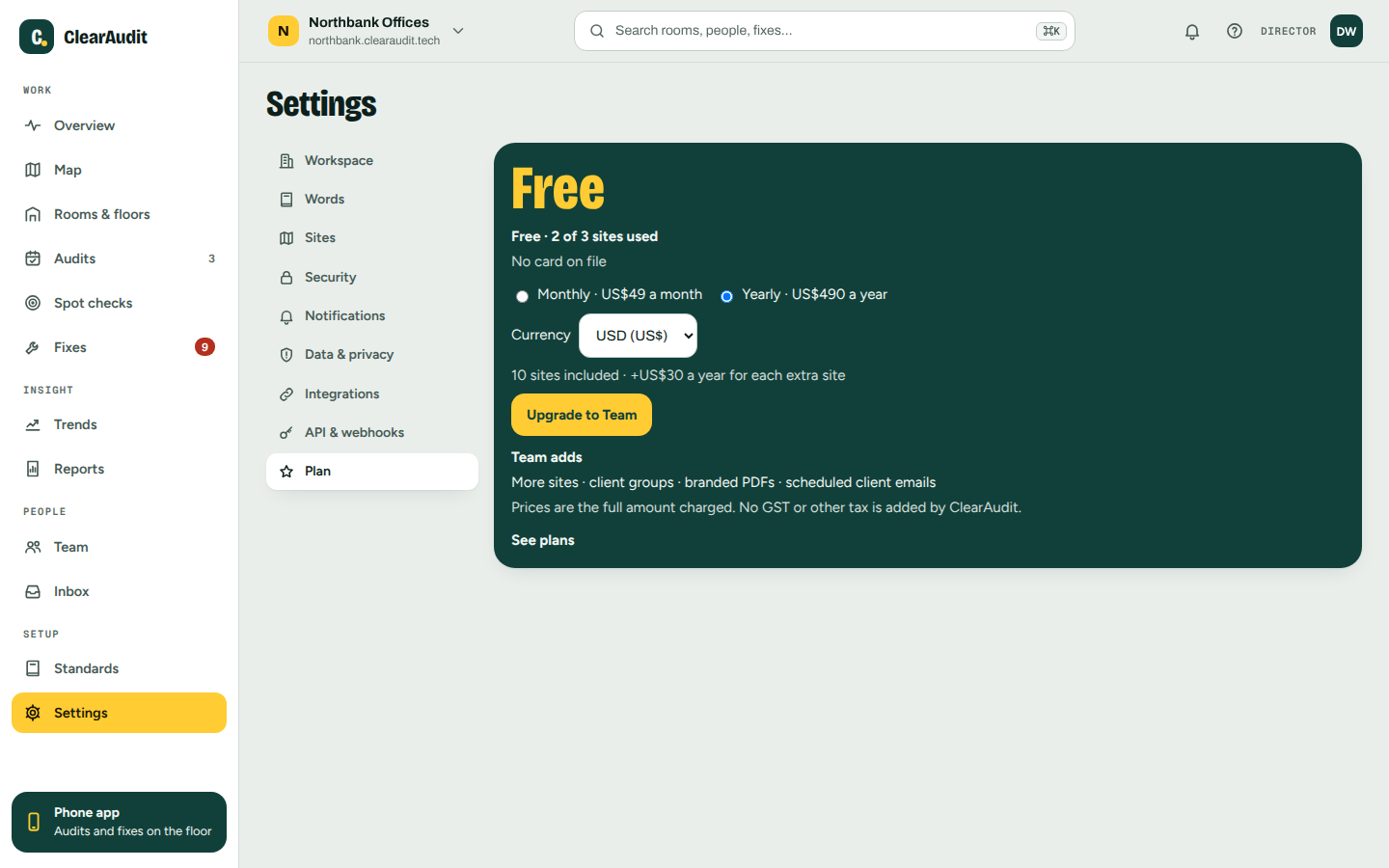
The price shown is the full amount you pay. ClearAudit adds no GST or other tax. The directors get an email, "Team plan started".
What you are charged
- The Team price, monthly or yearly, with 10 sites included.
- An extra-site charge for each site over 10. ClearAudit adds it when you add an 11th site and takes it off when you archive one. You don't need to do anything.
- Archived sites and the example site are never counted.
See invoices, change your card or switch period
- Open Settings > Plan and click Manage billing. Stripe's billing page opens.
- There you can update the payment method and download invoices. If you have 10 sites or fewer you can also switch between monthly and yearly. With more sites, email support@clearaudit.tech to switch.
Settings > Plan shows where you stand, for example "Paid to 14 Dec 2026".
Cancel
- Open Settings > Plan and click Manage billing.
- Cancel the subscription on Stripe's page.
Cancelling takes effect at the end of the period you have paid for. Until then nothing changes. The directors get an email with the end date, and another when Team has ended. The workspace then moves to the free plan.
Refunds
- Monthly: there is no refund for part of a month. Cancel any time and Team runs to the end of the month you have paid for.
- Yearly: you get a full refund if you ask within 14 days of paying, whether it is your first payment or a renewal. After that the plan runs to the end of the year, with no part-year refund.
- Deleting a workspace does not refund the rest of the period.
- To ask for a refund, email support@clearaudit.tech from a director's address.
Nothing here limits your rights under the Australian Consumer Law.
If a payment fails
- Stripe tries the card again over the following days.
- Settings > Plan shows a "Payment failed" line asking you to update your card, and the directors get a "Payment failed" email.
- Click Manage billing and update the card.
- If it stays unpaid, the workspace moves to the free plan and the directors are told by email.
What moving to the free plan does
- Nothing is deleted and nothing is locked. Your sites, rooms, audits, fixes and reports stay.
- You can't add another site while you have as many sites as the free plan covers (3), or more. Archive a site, or move back to Team.
- Client groups, per-client reports, your own branding on the client report PDF and scheduled client report emails stop until you are on Team again. Your schedules are kept and start again on Team.
Pilot companies
A pilot gets Team free for 8 weeks. After that the workspace is on the free plan until a director upgrades. Upgrading then gives 50% off Team for the first 6 months, once. The discount is applied at checkout for you.
Deleting the workspace
Deleting the workspace stops the subscription from renewing straight away, and cancels it when the workspace is deleted for good. If you restore the workspace within its 30 days, renewal is turned back on. See Deleting your account or workspace.
Good to know
- The plan belongs to the workspace, not to a person. There is no charge per user.
- Workspaces created before 31 October 2026 keep room for the sites they had then (at least 3) without paying, and keep client groups.
- When someone tries to add a site over the limit, the directors get a "Site limit reached" email, at most once every 7 days.
- Have a promotion code? Enter it on the payment form. The box is not shown when the pilot discount is applied.
- The full rules are in clause 3 of the terms at https://clearaudit.tech/terms.
- A billing question we should look at? Email support@clearaudit.tech from a director's address.
Related articles
Thanks. That helps keep this guide right.